Capture entire chats and pages with one tap on Android
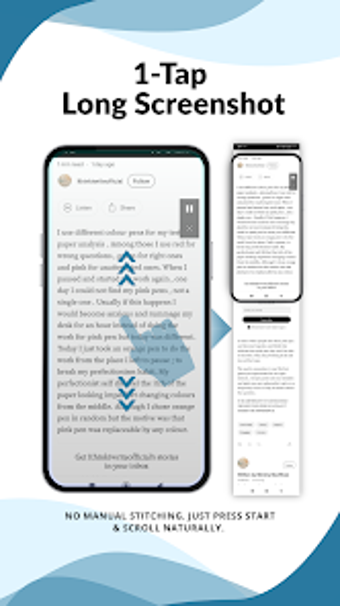
Capture long-form screens with ScrollSnap - Long Screenshot by IBN Labs, designed to record content that exceeds an Android device's visible area. The app automates multi-frame capture and stitches frames into a single continuous image using a True 1-Tap workflow, smart alignment, and anti-duplicate detection. It supports vertical and horizontal captures plus a web page mode. Social media users, students, and professionals benefit from on-device processing and fast archival of long conversations or articles.
What does ScrollSnap do for long content capture?
Moreover, ScrollSnap records successive frames while you scroll and aligns them into a single continuous image, so you avoid manual cropping and piecing. The app uses a True 1-Tap Capture start, smart auto-stitching to remove overlap, and anti-duplicate technology that ignores sticky headers and navigation bars. In addition, it handles both vertical and horizontal captures and provides a dedicated web page mode for full-length articles.
Does ScrollSnap slow down your device during capture?
In addition, image processing happens entirely on the device, so captures do not depend on network transfer and preserve privacy. The app is optimized for modern Android devices, which reduces variability in runtime behavior. However, actual CPU and memory use depend on device hardware and chosen output resolution. Practical capture cases include:
- chat logs and social feeds
- maps and wide tables
- full web articles
Is ScrollSnap simple for everyday users while offering advanced options?
Moreover, the app follows a "Just Scroll" approach, letting users begin capture with a single tap and natural scrolling, which suits social media enthusiasts, students, and professionals who archive conversations or articles. Advanced export choices such as ultra-HD images and watermarking are available in the Pro tier for users needing higher fidelity or branding. Users report consistently accurate long images, which indicates the stitching and duplicate removal perform reliably for routine archiving.
Practical choice for regular archiving with one main trade-off
ScrollSnap is a practical option for users who need single-image archives of long conversations, feeds, or articles, because it prioritizes on-device processing and a start-and-scroll workflow that simplifies capture. One trade-off is that higher-resolution exports and watermarking reside in the Pro tier, so those requiring ultra-HD output must enable that tier. For best results, keep scrolling steady during capture and use the web mode for long pages.